ECBS5293 · Session 2

Computing for Analytical Work

Session 2 — What is running?

Block 3 — Python interpreters, packages, imports, and environments

Block 3 — Python interpreters, packages, imports, and environments
ECBS5293 · Session 2

Knowledge check 2 — 10 minutes, closed book, 3 questions

  • Covers Session 1 and Homework 1: paths, working directory, terminal, git status
  • Laptops closed. Paper only.
  • Three short questions. Diagnostic, not tricky.
  • Worth 5% of the final grade
  • This block's lecture is 35 minutes, not 45 — the check comes out of lecture, never out of lab
  • Hand it in when the timer goes. Then we begin.
Block 3 — Python interpreters, packages, imports, and environments
ECBS5293 · Session 2

This block in one sentence

"Python" means a particular interpreter with a particular set of installed packages.

Not a language. Not an icon. A specific program, on a specific path, with a specific list of packages it can see.

Block 3 — Python interpreters, packages, imports, and environments
ECBS5293 · Session 2

What we cover

  • The reveal: what uv run has been doing all week
  • Interpreter, script, notebook
  • Packages, import, and sys.path
  • Installing into a specific environment; why installs "fail"
  • Many Pythons on one machine, and how to check which is active
  • uv: the one workflow this program uses
  • Git thread: git add, git commit
  • AI thread, stretch, and Lab 3
Block 3 — Python interpreters, packages, imports, and environments
ECBS5293 · Session 2

You have been typing uv run for a week

uv run python scripts/summarize.py — in the setup check, Lab 1, Lab 2, Homework 1. Every README said: "You will learn what uv run does in Session 2. For now, type it exactly." It is Session 2. This map is the answer.

Block 3 — Python interpreters, packages, imports, and environments
ECBS5293 · Session 2

Interpreter, script, notebook

  • Interpreter — a program, one executable file, that reads Python code and runs it
  • Script — a .py file the interpreter reads top to bottom, once, then exits
  • Notebook — a long-running interpreter (the kernel) you feed one cell at a time (Block 4, this afternoon)

In the Lab 3 project, this prints the interpreter that ran it:

uv run python -c "import sys; print(sys.executable)"
→ /Users/anna/ecbs5293-lab03-environments/.venv/bin/python3

That path is a file. You can ls it. (Windows: .venv\Scripts\python.exe.)

Block 3 — Python interpreters, packages, imports, and environments
ECBS5293 · Session 2

What a package is

  • A folder of Python code somebody else wrote, plus metadata
  • pandas, matplotlib, jupyter — each is a folder on disk, installed somewhere
  • Installed means: copied into a folder that one interpreter knows to look in

Same project, and this prints where a package lives:

uv run python -c "import pandas; print(pandas.__file__)"
→ /Users/anna/ecbs5293-lab03-environments/.venv/lib/python3.13/
      site-packages/pandas/__init__.py

Same .venv, one level deeper. Note that path — it matters in five slides.

Block 3 — Python interpreters, packages, imports, and environments
ECBS5293 · Session 2

What import actually does

import pandas
  1. The interpreter takes a list of folders called sys.path
  2. It walks that list, in order, looking for a folder or file named pandas
  3. First match wins. No match: ModuleNotFoundError

import is a search. It is not a download, and it is not a question about your laptop.

Block 3 — Python interpreters, packages, imports, and environments
ECBS5293 · Session 2

sys.path belongs to that interpreter

So "is pandas installed?" is an incomplete question. Installed for which interpreter?

Block 3 — Python interpreters, packages, imports, and environments
ECBS5293 · Session 2

Installing into a specific environment

  • An environment is one interpreter plus the folders it searches. That is all it is.
  • Installing a package puts it into one environment
  • This course: every project has its own environment, in .venv/, inside the project folder
uv add <package>

Every external package your code imports needs a line in pyproject.toml. uv add installs it and writes the line. Python's own built-in library — sys, pathlib — is already there; it needs nothing. Watch; you type uv add in the lab.

Block 3 — Python interpreters, packages, imports, and environments
ECBS5293 · Session 2

Why installs "fail"

pip is a package installer. The pip you type belongs to one particular Python, and installs into that one — that is the whole problem. The install did not fail; it succeeded, somewhere else.

Block 3 — Python interpreters, packages, imports, and environments
ECBS5293 · Session 2

Many Pythons on one machine

Each has its own sys.path. Nothing coordinates them. Which one runs is decided by which one you invoke.

Bare python is resolved by the shell walking a list of folders called PATH — first match wins, and every installer puts its own folder at the front. In Git Bash, always pass an argument: bare python either hangs with no error or drops you into Python's >>> prompt.

Block 3 — Python interpreters, packages, imports, and environments
ECBS5293 · Session 2

Predict: two Pythons, side by side

python -c "import sys; print(sys.executable)"
uv run python -c "import sys; print(sys.executable)"

My laptop. A terminal outside VS Code, standing in a project folder like yours, thirty seconds apart. Will these two commands print the same path?

Write down yes or no, and one reason. Do not type yet.

(The recording then asks each of those two Pythons the same import matplotlib.)

Block 3 — Python interpreters, packages, imports, and environments
ECBS5293 · Session 2

Two Pythons — what happened

Two paths. The first is whatever my shell found; the second is this project's interpreter. Then the same import, asked of each.

Block 3 — Python interpreters, packages, imports, and environments
ECBS5293 · Session 2

What you just saw, on the map

The project's own environment, versus every other Python on the laptop. That contrast is the whole block.

Block 3 — Python interpreters, packages, imports, and environments
ECBS5293 · Session 2

Part 2 — uv: the one workflow

Block 3 — Python interpreters, packages, imports, and environments
ECBS5293 · Session 2

The three commands

uv sync                      # install everything the project declares
uv add pandas                # declare and install a new dependency
uv run python script.py      # run a script inside the project's environment

Typed in your terminal, always from inside the project folder. That is the whole workflow for this program. Watch this one; nothing to type — script.py is a placeholder, not a file in this repo.

Block 3 — Python interpreters, packages, imports, and environments
ECBS5293 · Session 2

pyproject.toml and uv.lock, in plain words

Block 3 — Python interpreters, packages, imports, and environments
ECBS5293 · Session 2

So what was uv run doing?

uv run's quiet sync adds what is missing and leaves hand-installed extras alone. A plain uv sync makes .venv match the declaration exactly — and removes them.

Block 3 — Python interpreters, packages, imports, and environments
ECBS5293 · Session 2

The notebook standard: the project's own kernel

Above: VS Code's kernel picker, macOS on the left, Windows on the right.

  1. Open the project folder (never the lone .ipynb). 2. Kernel picker → the interpreter inside .venv/. 3. Verify: import sys; sys.executable in a cell prints a path inside this project's .venv/.
Block 3 — Python interpreters, packages, imports, and environments
ECBS5293 · Session 2

In the wild: requirements.txt

  • Older repos, blog posts, and other courses ship requirements.txt instead of pyproject.toml
  • Same job, older file: make this project's packages available to its interpreter
  • You will not write one in this course. You need to be able to recognise one.

If a README says pip install -r requirements.txt and there is no such file, that README is wrong.

Block 3 — Python interpreters, packages, imports, and environments
ECBS5293 · Session 2

A whiff of Git — save a checkpoint

git status          # what changed?
git add .           # stage it: "include these in the next snapshot"
git commit -m "Fix the output path in analyze.py; add notes"

A commit is a checkpoint after a working fix. Commit when it works. Not before, not "at the end". Watch now; you type these in the lab.

Block 3 — Python interpreters, packages, imports, and environments
ECBS5293 · Session 2

After you commit: git status first, then git diff

  • git status covers everything: unstaged edits, staged work, and files Git has never seen. "nothing to commit, working tree clean" is the completeness check.
  • git diff alone shows unstaged edits to tracked files. Staged work and new files are invisible to it.
Block 3 — Python interpreters, packages, imports, and environments
ECBS5293 · Session 2

AI thread — ask for evidence, not for a fix

Good questions for an assistant today:

  • "What evidence distinguishes 'package not installed' from 'installed in a different environment'?"
  • "What does uv sync actually do? What is pyproject.toml? How is uv different from pip or conda?"
  • "Here is sys.executable from my terminal and from my notebook. They differ. What does that mean?"

Then run the inspection yourself and paste the real output.

Block 3 — Python interpreters, packages, imports, and environments
ECBS5293 · Session 2

The active interpreter decides what is true

  • AI can suggest causes. It cannot see your machine.
  • sys.executable shows which interpreter answered; printing sys.path shows where it searched.
  • If the assistant says "it's installed" and the interpreter says ModuleNotFoundError, the interpreter is right.

Sources of truth today: the filesystem, the interpreter, uv's output. Everything else is a hypothesis.

Block 3 — Python interpreters, packages, imports, and environments
ECBS5293 · Session 2

5-minute stand-and-stretch

Stand up. Leave the laptop. Back in five.

Block 3 — Python interpreters, packages, imports, and environments
ECBS5293 · Session 2

Lab 3 — It imports on my machine, but not here

First 15 minutes: no AI. Chat windows and assistant panels closed; VS Code itself stays open. Terminal, filesystem, and uv output only. Search engines are fine.

Why: every failure today is one an assistant diagnoses instantly. The reflex we want is "check which interpreter," not "ask what to check." The exam has no chat window. Solve it in five minutes and write the note; the fifteen minutes are for looking, not for suffering.

TAs will ask you to close a window. That is not a penalty.

Block 3 — Python interpreters, packages, imports, and environments
ECBS5293 · Session 2

The symptom, and how to run it
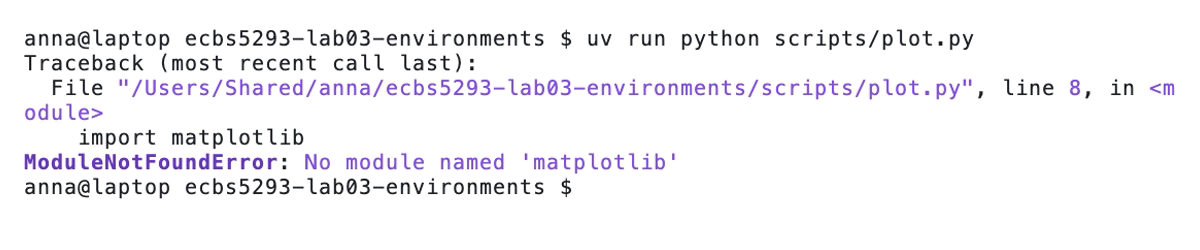
In your terminal (Git Bash on Windows, Terminal on macOS), in the folder where you keep course work:

git clone https://github.com/earino/ecbs5293-lab03-environments.git
cd ecbs5293-lab03-environments
uv sync
uv run python scripts/plot.py

The README says pip install -r requirements.txt. There is no such file. Your job: which interpreter is looking, what the project declares, and why they disagree. Edit files in VS Code (open the folder; trust it if asked). The same three lines are at the top of the README.

Block 3 — Python interpreters, packages, imports, and environments
ECBS5293 · Session 2

What you produce, and the last ten minutes

  1. pyproject.toml declares the missing dependency (uv add, not a hand edit) — checked by a plain uv sync, then uv run python scripts/plot.py runs clean and writes the PNG. Sync first, then run.
  2. README setup instructions are correct for this repo
  3. DIAGNOSIS.md: symptom, cause, evidence (paste real output), change, verification
  4. One commit of the working state; git status reports a clean tree afterward
  5. At minute 33: explain it to a neighbour, about a minute, no notes; the what-if about environments is on the next slide. Checkpoint on Moodle before you leave.

Reset instructions are in the README; both resets destroy work.

Block 3 — Python interpreters, packages, imports, and environments
ECBS5293 · Session 2

The last ten minutes — explain it to a neighbour

Speaker, about a minute, pointing at the screen, not reading the note: symptom → cause → evidence → change → verification.

Listener asks:

  1. Show me the evidence.
  2. Why did it fail — not just where?
  3. Suppose you had fixed this with uv pip install matplotlib instead of uv add, and committed. A classmate clones your repo and runs uv sync && uv run python scripts/plot.py. What happens, and why?

Swap. Unsure, or you disagree? Hand up. Then the answer, for everyone. Before you leave: DIAGNOSIS.md to the Lab 3 checkpoint on Moodle.

Block 3 — Python interpreters, packages, imports, and environments