ECBS5293 · Session 2

Computing for Analytical Work

Session 2 — What is running?

Block 4 — Notebooks, scripts, state, and reproducibility

Block 4 — Notebooks, scripts, state, and reproducibility
ECBS5293 · Session 2

This block in one sentence

A notebook is an interface to a running Python process with hidden state. A script starts fresh each time.

Hidden state is why a notebook can look finished and be broken.

Block 4 — Notebooks, scripts, state, and reproducibility
ECBS5293 · Session 2

What we cover

  • The page and the kernel: two things, one screen
  • What the kernel remembers, with a prediction — then you make it happen on your own kernel
  • The three ways that memory lies: order, leftovers, saved outputs
  • Restart, then Run All — the execution test, and what it does not test
  • Notebook vs script; minimal reproducibility
  • Where the kernel comes from: the rule, again
  • Git thread: commit messages, checkpoints you can return to, .gitignore
  • AI thread, stretch, Lab 4, and Homework 2
Block 4 — Notebooks, scripts, state, and reproducibility
ECBS5293 · Session 2

What a notebook actually is

Block 4 — Notebooks, scripts, state, and reproducibility
ECBS5293 · Session 2

Delete a cell. The kernel does not notice.

Block 4 — Notebooks, scripts, state, and reproducibility
ECBS5293 · Session 2

Predict: what is y?

Cell 1 said x = 10 when cell 2 ran. Then cell 1 was edited to x = 20 and run alone. Write down what x and y are in the kernel right now, and one line on why. Do not run anything — this one is on paper, from the screenshot.

Block 4 — Notebooks, scripts, state, and reproducibility
ECBS5293 · Session 2

Reveal: the page says 25. The kernel says 15.

Block 4 — Notebooks, scripts, state, and reproducibility
ECBS5293 · Session 2

How you know a cell has finished

A cell has stopped when its spinner is gone: a green tick means it succeeded, a red cross means it failed and the run stopped there.

  • [*] — still running. Wait. Clicking again does not make it faster; it queues a second run.
  • [ ] — no run is recorded for it on this kernel, whatever output sits underneath.
  • A markdown cell never gets a number at all.

You will need every one of these in the lab, reading a page somebody else ran.

Block 4 — Notebooks, scripts, state, and reproducibility
ECBS5293 · Session 2

Ask the kernel what it remembers

%whos in any cell prints the blue kernel box from the last four diagrams: every name the kernel holds, with its type and value. Not what the page says. What the process has.

Block 4 — Notebooks, scripts, state, and reproducibility
ECBS5293 · Session 2

Variables that exist only because of earlier runs

  • You renamed sales to df in cell 2. Cell 7 still says sales. It still works.
  • Because sales is still in the kernel, from before the rename.
  • Save, close, reopen tomorrow, run cell 7: NameError: name 'sales' is not defined

The notebook did not break overnight. It was broken this afternoon. The kernel was covering for it.

Block 4 — Notebooks, scripts, state, and reproducibility
ECBS5293 · Session 2

Imports after first use

# cell 4
import pandas as pd
  • pd was first used in cell 1. It worked, because you ran cell 4 last week.
  • Fresh kernel, top to bottom: cell 1 fails with NameError: name 'pd' is not defined
  • Rule: all imports in the first cell. Then a fresh kernel cannot lie about them.
Block 4 — Notebooks, scripts, state, and reproducibility
ECBS5293 · Session 2

Saved outputs are a screenshot of the past

Block 4 — Notebooks, scripts, state, and reproducibility
ECBS5293 · Session 2

The truth test

Block 4 — Notebooks, scripts, state, and reproducibility
ECBS5293 · Session 2

Restart, then Run All

Kills the process; every variable and import is gone; runs every cell top to bottom from nothing. If it finishes clean, the page and the kernel agree. If it fails, the page was lying. Clean says nothing about whether the numbers are right.

Block 4 — Notebooks, scripts, state, and reproducibility
ECBS5293 · Session 2

Where the test lives in VS Code
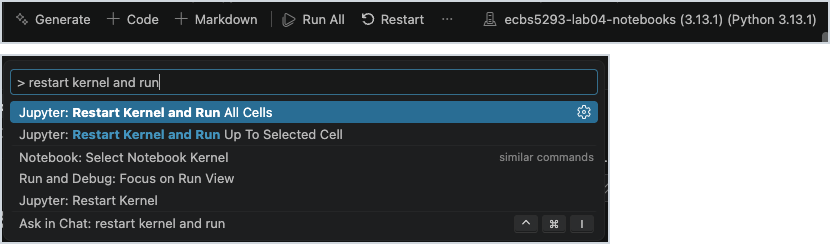
Above: the notebook toolbar (top) and the Command Palette (bottom) — both in VS Code.

Two clicks in the toolbar, Restart then Run All, or one palette entry: Jupyter: Restart Kernel and Run All Cells. Run All alone is not the test: the kernel keeps its memory.

It has stopped when nothing shows [*] any more. A clean run gives every code cell a number and a green tick. A red cross means that cell failed and the run stopped there — which is exactly what Lab 4 will do to you.

Block 4 — Notebooks, scripts, state, and reproducibility
ECBS5293 · Session 2

Notebook vs script

  • Notebook — exploring. Look at a dataframe, try a plot, change your mind. State is the feature.
  • Script — repeating. Same input, same steps, same output, every time. No state survives.
  • A script cannot carry kernel state between runs; it starts from nothing every time. Its inputs can still change its output. For this course's scripts: same input, same output.

When a notebook has stopped changing and you just need it to run again tomorrow, that is a script.

Block 4 — Notebooks, scripts, state, and reproducibility
ECBS5293 · Session 2

Minimal reproducibility

The only question: can I restart and run it again?

  • Fresh kernel, or a fresh uv run python scripts/analyze.py, on a fresh uv sync
  • Same output as last time, from the code as it is on the page, right now
  • Not "did it ever work." Not "does the chart look right." Will it work again, from nothing?

This is the standard for every deliverable in this course from today on.

Block 4 — Notebooks, scripts, state, and reproducibility
ECBS5293 · Session 2

Where the kernel comes from — the rule, again

After uv sync: open the project folder in VS Code → kernel picker → the .venv/ interpreter.

  • If the picker points at Anaconda's Python, or another project's .venv, your code is right but it is running somewhere else — different packages, different versions. An import may fail with ModuleNotFoundError; it may also succeed, in the wrong environment, which is worse.
  • The picker is not the proof. The .venv entry can appear, vanish, or come back without its star while the kernel is in fact correct.
  • The proof is the printed path: import sys; print(sys.executable) in a cell — the same move you made in Homework 1 with os.getcwd().
Block 4 — Notebooks, scripts, state, and reproducibility
ECBS5293 · Session 2

Three things a kernel has that the page does not show

Hidden property Session The question The check
a working directory 1 Where am I? Path.cwd() in a cell
an interpreter 2, Block 3 Which Python? sys.executable in a cell
a memory 2, Block 4 In which state? %whos; then Restart and Run All

Every notebook failure in this course is one of these three. The page shows none of them.

Block 4 — Notebooks, scripts, state, and reproducibility
ECBS5293 · Session 2

A whiff of Git — checkpoints, and what not to commit

Block 4 — Notebooks, scripts, state, and reproducibility
ECBS5293 · Session 2

Good commit messages

  • Say what changed and why it is now correct. Present tense. One line.
  • A message is for the person reading git log in six weeks. That person is you.

The message should let a reader decide whether to look at the diff without looking at the diff.

Block 4 — Notebooks, scripts, state, and reproducibility
ECBS5293 · Session 2

Commit early, commit ugly

  • Your history is for future-you, not an audience. Five ugly checkpoints beat one polished commit, because checkpoints are what git restore can reach.
  • echo here overwrites the whole file — a stand-in. In the lab you delete two cells and save.
  • One thing to recognize, not learn: git status starts with On branch main. A branch name you don't recognize there? Stop and ask a TA.
Block 4 — Notebooks, scripts, state, and reproducibility
ECBS5293 · Session 2

Why your notebook is always "modified"

  • A .ipynb is a text file of JSON: the code, and every saved output, and every bracket number
  • Restart and Run All rewrites the outputs and renumbers the brackets. Save, and git status says M, even if you changed no code.
  • git diff on a notebook is a wall of JSON. Read git status for whether; open the notebook for what.
  • So: run clean → save → commit. The outputs in the commit are the ones a fresh kernel produced.
Block 4 — Notebooks, scripts, state, and reproducibility
ECBS5293 · Session 2

.gitignore — what it is

  • A plain text file at the repo root, listing paths Git should skip
  • Ignored paths are skipped by git status and by git add ., so the ordinary accident cannot happen
  • Two limits: .gitignore only stops Git adding new files. A file that was committed before the rule existed stays tracked, and git add -f forces one in anyway. A guard, not a law.
  • Every course repo ships the same standard one. You will read it, not write it.

Git is for source work and meaningful checkpoints, not local junk.

Block 4 — Notebooks, scripts, state, and reproducibility
ECBS5293 · Session 2

The file that ships in every course repo

Block 4 — Notebooks, scripts, state, and reproducibility
ECBS5293 · Session 2

Predict: the guard, tested

  • Last week, before this file existed, you ran git add . and committed. .venv/ went in.
  • Today .venv/ is in .gitignore. You run uv sync, which rewrites files inside .venv/.
  • What does git status show now? Write one line. Do not type.
Block 4 — Notebooks, scripts, state, and reproducibility
ECBS5293 · Session 2

AI thread — three good uses today

  • "Here is my notebook. Which cells depend on state from cells that run later? Where are the hidden-state risks?"
  • "Restart and Run All fails at cell 3 with this NameError. Here is the cell order and the traceback. Why?"
  • "Here are my cleaning and summary cells. Help me move them into a script that runs fresh from the command line."

Give it the actual cell order and the actual traceback. Then restart and run it yourself.

Block 4 — Notebooks, scripts, state, and reproducibility
ECBS5293 · Session 2

AI can clean up code. Restart and Run All is the truth test.

  • The assistant can reorder cells, name things better, and write the script. Good.
  • It cannot run your kernel. It does not know what your kernel remembers.
  • Every AI suggestion in a notebook ends the same way: Restart Kernel and Run All. Clean or not clean.

That is the third time. It will be on the exam.

Block 4 — Notebooks, scripts, state, and reproducibility
ECBS5293 · Session 2

5-minute stand-and-stretch

Stand up. Leave the laptop. Back in five.

Block 4 — Notebooks, scripts, state, and reproducibility
ECBS5293 · Session 2

Lab 4 — The notebook lies

In your terminal (Git Bash on Windows, Terminal on macOS), in the folder where you keep course work:

git clone https://github.com/earino/ecbs5293-lab04-notebooks.git
cd ecbs5293-lab04-notebooks
uv sync
  • While that syncs, read the rest of this slide. Then open the folder in VS Code (trust it if asked).
  • Open notebooks/clean_and_plot.ipynb; kernel → .venv/; verify with import sys; print(sys.executable) in a cell
  • This is how it opens. Every result is there. Do not trust them. Restart, then Run All. It fails: read the error, note the cell it names, and work out why that cell cannot run from a fresh kernel.
  • Fix it so the page tells the truth top to bottom. Move a cell by dragging its left edge or with Alt+↑/↓; delete with the cell's bin icon. Then commit, and do the recovery drill.
Block 4 — Notebooks, scripts, state, and reproducibility
ECBS5293 · Session 2

What you produce, and the last ten minutes

  1. The notebook passes Restart Kernel and Run All Cells — clean, top to bottom, twice
  2. Imports in the first cell; no cell depends on a later one
  3. One commit with a message that says what you fixed; git status clean afterward, no .ipynb_checkpoints/ or .venv/ in it
  4. Recovery practised: two cells deleted and saved (not staged), brought back with git restore, then a clean run again
  5. DIAGNOSIS.md: symptom, cause, evidence (the NameError line, the cell numbers), change, verification
  6. At minute 33: explain it to a neighbour, about a minute, no notes; the what-if about kernel state is on the last slide, which goes up then. Checkpoint on Moodle before you leave.

Stretch: move the load-clean-summarize steps into a script that runs fresh with one command, plus one sanity check. Resets in the README; both destroy work.

Block 4 — Notebooks, scripts, state, and reproducibility
ECBS5293 · Session 2

Homework 2 assigned

Python execution, environments, notebooks, and Git checkpoints — 15% of the grade, 6–7 hours. Due the Friday after this session, 23:59 — slot on Moodle.

A repo that fails for environment reasons and notebook execution-order reasons. Deliver:

  • working setup instructions
  • dependency file (pyproject.toml + uv.lock, via uv add)
  • a notebook that passes Restart Kernel and Run All
  • two meaningful commits — one after the environment fix, one after the notebook fix — with real messages
  • a diagnosis note per failure, with the reconciliation: script table = notebook numbers, to the cent; selection = the README's threshold
  • RECOVERY.md: break a committed file on purpose, git restore it, prove it
  • a 60–90 second video: Restart and Run All succeeding, then what broke, what changed, how you verified
Block 4 — Notebooks, scripts, state, and reproducibility
ECBS5293 · Session 2

The last ten minutes — explain it to a neighbour

Speaker, about a minute, pointing at the screen, not reading the note: symptom → cause → evidence → change → verification.

Listener asks:

  1. Show me the evidence.
  2. Why did it fail — not just where?
  3. Predict first, do not try it yet: you ran the cleaning cell, so df_clean exists. Delete that cell from the page and run the summary cell. Does it work? Now Restart and Run All. Does it work?

Swap. Unsure, or you disagree? Hand up. Then the answer, for everyone. Before you leave: DIAGNOSIS.md to the Lab 4 checkpoint on Moodle.

Block 4 — Notebooks, scripts, state, and reproducibility